I spend more time using coding agents from the terminal than from desktop apps. That makes it easy to start a useful session, but surprisingly awkward to find it again later: Which agent did I use? Which repository was I in? What did we discuss before I stopped?
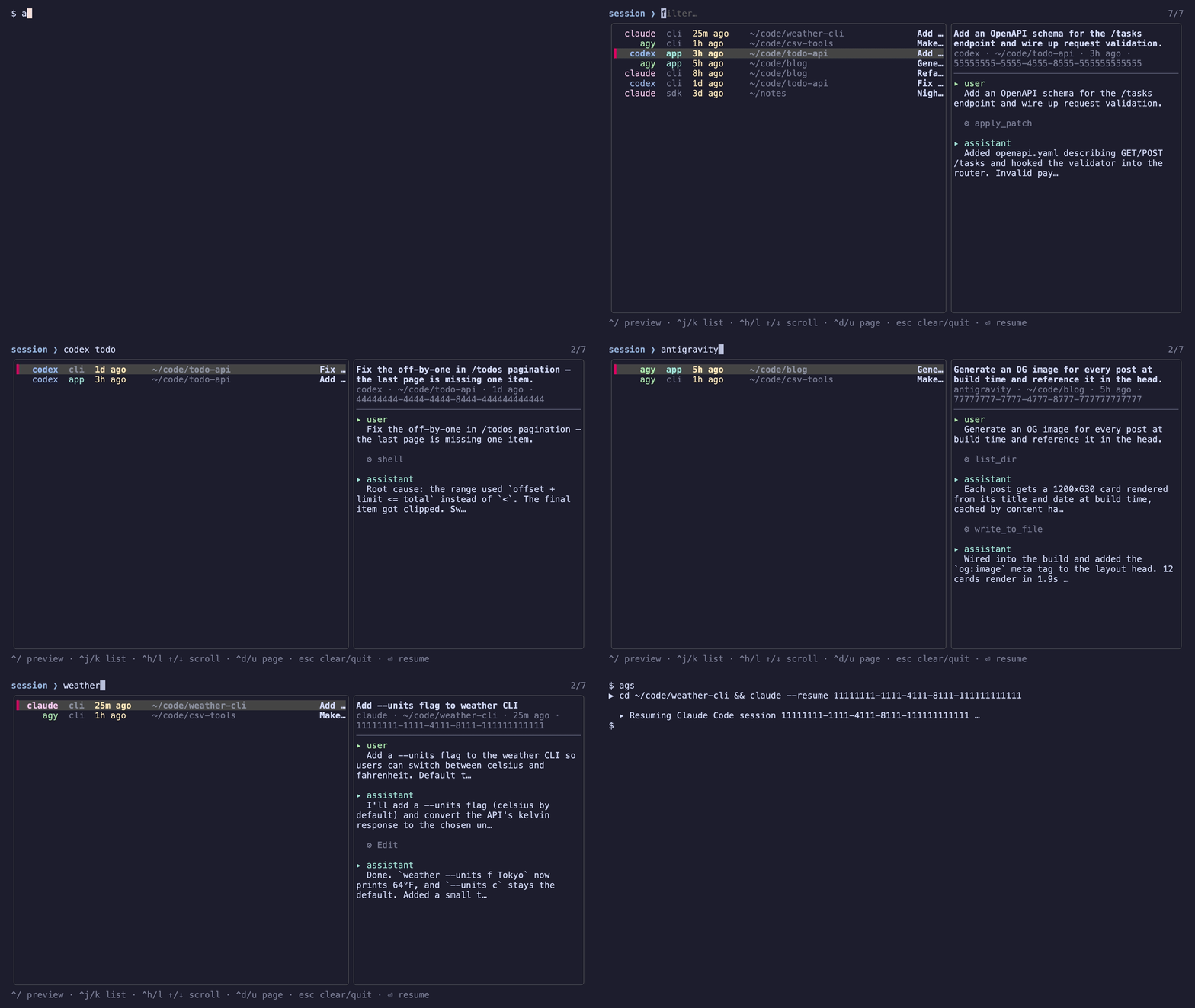
I built agent-sessions, or ags, to make that workflow simpler. It gives me one fuzzy-searchable list of my local Claude Code, Codex, and Antigravity sessions, a live transcript preview, and a way to resume the selected session with the correct agent in its original working directory.
brew install Thieurom/tap/ags
ags
One workflow, different session layouts
Coding agents keep useful local history, but they do not store it in the same shape. Both Claude Code and Codex write JSONL transcripts, yet their session paths and resume commands differ:
| Agent | Session location | Resume command |
|---|---|---|
| Claude Code | ~/.claude/projects/<cwd>/<id>.jsonl | claude --resume <id> |
| Codex | ~/.codex/sessions/YYYY/MM/DD/rollout-*-<id>.jsonl | codex resume <id> |
| Antigravity | ~/.gemini/antigravity-cli/brain/<id>/.system_generated/logs/transcript_full.jsonl | agy --conversation <id> |
ags handles those differences through small adapters. It reads each transcript, extracts enough context to show a useful row with the agent, surface, age, directory, and title. It then uses the appropriate command to resume the session. Antigravity does not record its working directory in the transcript, so ags recovers it from the sibling history.jsonl file when possible.
The picker is a native terminal UI with fuzzy filtering and a live preview, so I can usually find a past conversation from a few words rather than from a session ID.
From a script to a terminal UI
The first prototype was a single Python script. It collected the session data and displayed it in fzf’s prompt, which meant fzf had to be installed separately. That was enough to prove the idea was useful for my own workflow.
I then asked Claude to rebuild it from scratch in Go. Version 0.1.0 still used fzf, but the rewrite gave the tool a cleaner foundation. In version 0.2.0, I removed the fzf dependency and built the terminal UI directly, using the Go ecosystem, including Bubble Tea for the interface and fzf’s matching algorithm in-process.
I chose Go because I find it simple to work with and because it has a rich ecosystem for command-line tools. fzf itself is written in Go, although that did not require ags to be written in Go. I still liked the fit: one small compiled binary, straightforward distribution, and good libraries for a terminal interface.
Read-only by design
The tool is deliberately conservative. It indexes the JSONL files but never edits them. Your agents remain the owners of their session data; ags is just a faster way to browse and reopen it.
If you use any of these agents from the CLI and it makes returning to old work a little easier, I hope you find it useful too.
The project is open source under the MIT license: github.com/Thieurom/agent-sessions.